
Best Photo for a Dime Dime Baby AI Dance Video
Choose the best photo for a Dime Dime Baby AI dance video with practical guidance on full-body framing, lighting, pose, background, and common fixes.
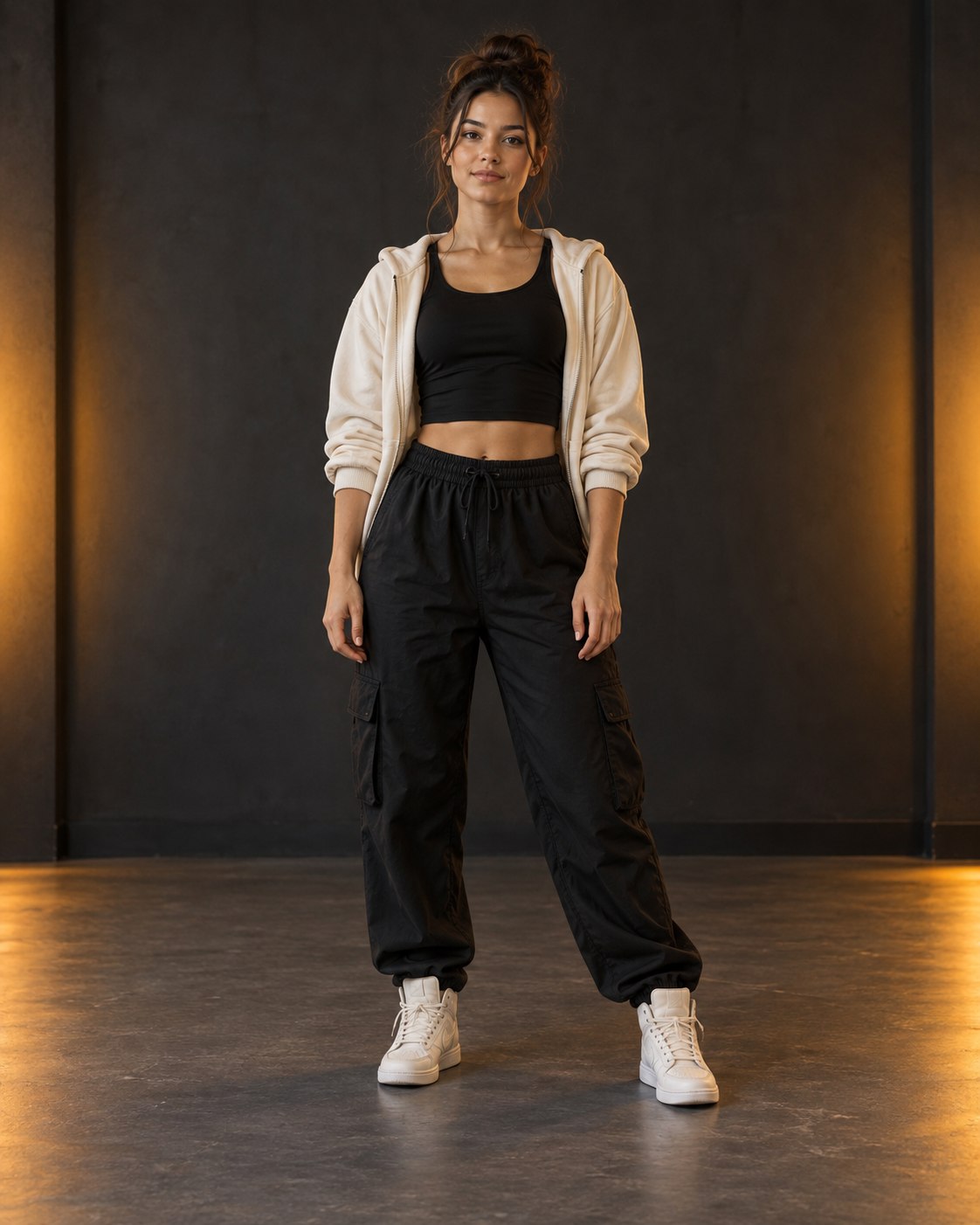
The source photo is the most important choice you make before generating a Dime Dime Baby dance video. A polished portrait is not always the best dance input: a close-up can have a beautiful face but provide no useful view of the legs, feet, or stance.
The best photo is clear, complete, and easy to read at phone size. Use this guide to choose between images, fix common framing problems, and avoid spending a video on a photo that was never suited to full-body movement.
The ideal photo in one sentence
Choose one sharply focused subject, standing with the full body and both feet visible, facing roughly toward the camera in even light against a simple background.
That description is a target, not a demand for a professional shoot. A normal phone photo can work well when it gives the subject a clean silhouette.
Full body or selfie?
For a full dance, start with a full-body image. A selfie crops out the information that defines most movement: shoulder position, arm length, hips, knees, and foot placement.
A three-quarter image may be usable when most of the legs remain visible, but it carries a larger risk of awkward lower-body framing. If you have both options, use the full-body photo first.
Before generating, upload the image to the generator preview. The portrait frame uses a fit view so you can confirm the whole source image is present rather than judging a cropped thumbnail.
Six things to check
1. One obvious subject
Group photos create competing silhouettes. Crop to one person when the crop can still include the full body at useful resolution. Otherwise choose a different original.
2. Complete arms and legs
Keep hands, elbows, knees, and shoes inside the frame. Avoid railings, tables, bags, or another person covering large parts of the body.
3. A stable standing pose
A relaxed front-facing or slight three-quarter pose gives the dance a neutral starting point. Sitting, crouching, jumping, or strongly crossed limbs can make the opening shape harder to interpret.
4. Even, readable light
Window light or open shade is often enough. Avoid a bright light directly behind the subject, heavy colored stage lighting, or shadows that remove facial and clothing detail.
5. Separation from the background
A dark outfit against a black wall can merge into one shape. Pick a photo with some brightness or color contrast around the head, torso, arms, and legs.
6. Enough resolution
Use the original photo rather than a screenshot of a social post. Do not enlarge a tiny image and expect new detail. Sharp edges and recognizable facial features are more useful than aggressive smoothing.
A quick photo scorecard
Give the photo one point for each “yes”:
- Is there only one main subject?
- Is the face in focus?
- Are both hands visible or clearly separated from the body?
- Are both knees and feet inside the frame?
- Is the person larger than background distractions?
- Can you see clothing edges against the background?
- Is the image free from major motion blur?
- Does the pose look balanced rather than mid-fall?
A score of seven or eight is an excellent candidate. Five or six may still be worth trying. Below five, look for another source before opening checkout.
Common photo problems and better fixes
The feet are cropped
Do not add blank space under the image and assume it restores the pose. Find a wider original photo where the shoes and floor are visible.
The face is small
Crop some empty space around the subject, but preserve the full body and vertical shape. Avoid a crop that turns a good full-body photo into a tight portrait.
The background is busy
Choose another angle or image if possible. A simple wall, hallway, street, or open room often reads better than a crowd.
The image contains a mirror reflection
Reflections can look like a second subject. Prefer a direct photo without a large duplicate figure.
One arm is hidden behind the body
A different pose with visible arms is better than trying to repair the hidden limb through cropping.
Prepare the frame for vertical publishing
Keep useful space around the subject instead of placing the face, hands, or feet directly against an edge. That makes the 9:16 result easier to watch after a social app places interface controls or captions over the video. See the TikTok, Reels, and Shorts publishing guide for a practical safe-area checklist.
Pick the duration after the photo
Once you have a clear source, create the current 10-second video. Each generation uses one video from your pack. The 10-versus-15-second comparison explains pacing differences, but 15 seconds is not a current output option.
Frequently asked questions
Is a full-body photo better than a selfie?
For a full dance, a standing full-body photo usually provides more usable information because the arms, legs, and feet are visible.
What background works best?
Use a simple background with clear contrast around the subject. Avoid crowds, mirrors, and objects covering the body.
Can I use a photo taken on a phone?
Yes. A sharp phone photo works well when it is evenly lit, not heavily compressed, and shows the subject clearly.
Put the checklist into practice
Choose your strongest image and inspect it in the full portrait upload preview. If it passes the checklist, create the current 10-second video. You can review the one-time video packs first or follow the complete three-step Dime Dime Baby tutorial.
Keep exploring
Related Dime Dime Baby guides
How to Make a Dime Dime Baby AI Video in 3 Steps
Make a 10-second Dime Dime Baby AI dance video from one photo in three clear steps, with practical photo and sharing tips.
Read articlePublishing guideDime Dime Baby Video for TikTok, Reels and Shorts
Prepare a 9:16 Dime Dime Baby AI video for TikTok, Instagram Reels, and YouTube Shorts with framing, duration, caption-safe-area, preview, and download tips.
Read articleFormat guide10 vs 15 Seconds: Current Dime Dime Baby Video Length
The generator currently creates a 10-second Dime Dime Baby AI video; learn how that length compares with a 15-second short-form clip.
Read articlePut the guide into practice
Make your Dime Dime Baby video.
Upload one photo to create a 10-second video. Sign in only when you are ready to generate.